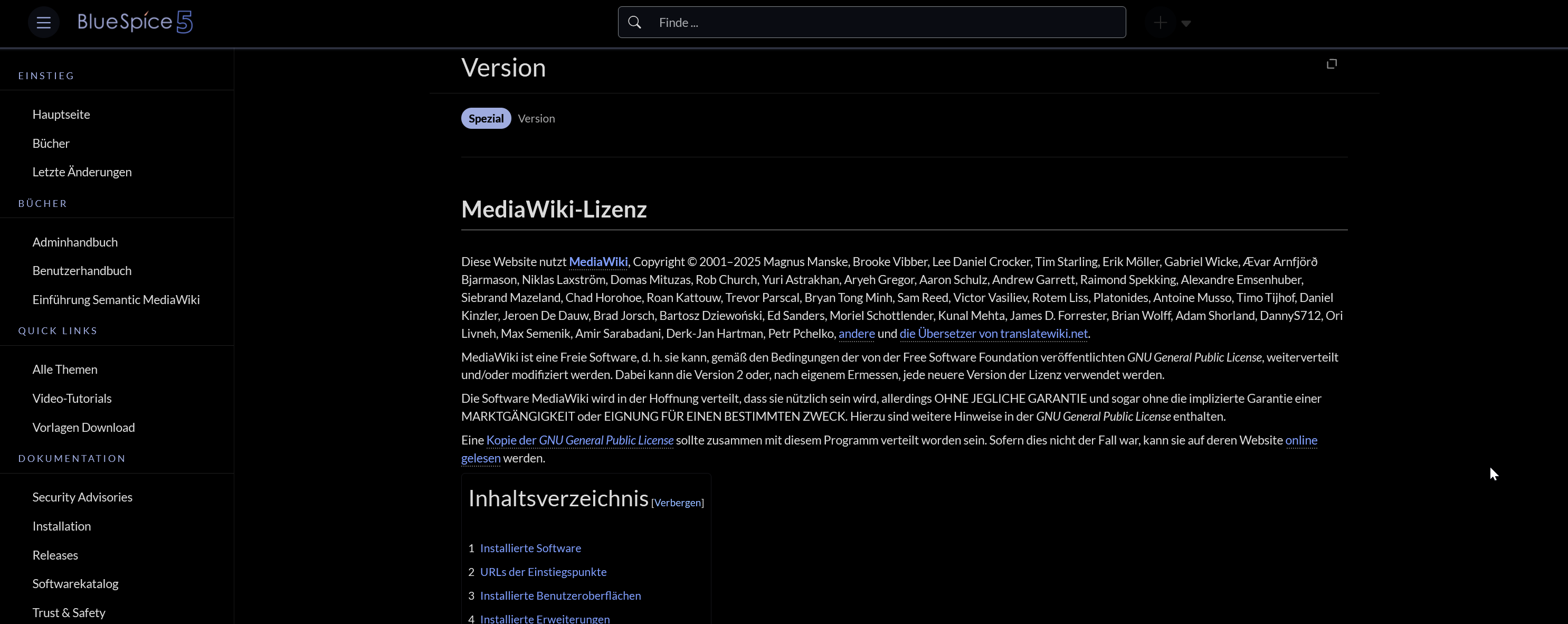
BlueSpice Discovery 5.2.0 Inverts All Colors

Describe the issue / Steps to reproduce:
in Version – BlueSpice Helpdesk All Colors are Simply Inverted when the browser prefers the dark color theme. Proabably due to BlueSpice Discovery 5.2.0. (code not released yet)

Can you at least use invert(100%) hue-rotate(180deg) to keep the colors normal?

Of course implementing a real darkmode would be even better.. but i already prefer this.

Expected behavior:
Not invert the colors as well.

What was the error message/error log?

Screenshots
Attached above.

Hello SaiCode,

thanks for trying out the Discovery skin under development. For your mentioned filter, you can define it this way in your MediaWiki:Common.css page:

@media (prefers-color-scheme: dark) {
    html[dir="ltr"] {
        filter: invert(100%) hue-rotate(180deg);
    }

    html[dir="ltr"] img {
        filter: invert(100%) hue-rotate(180deg);
    }
}

html[dir="ltr"].bs-discovery-base-dark {
    filter: invert(100%) hue-rotate(180deg);
}

html[dir="ltr"].bs-discovery-base-dark img {
    filter: invert(100%) hue-rotate(180deg);
}

Hope this helps = )

Greetings,
Hua

okay.. so its not a upcoming feature- it was only tested in the specific wiki?

It is an upcoming feature. Unfortunately, it turned out to be automatically enabled in unexpected cases. We will disable the feature until there is a more robust solution (will probably happen on bluespice.cloud automatically throughout this week). My apologies for any inconveniences.